


Race Craft - Kids Car Games
4.6963.00 Reviews
App Specs
- Version
- 2026.1.0
- Updated On
- License
- Free
- Downloads
- 10,000,000+
- Developer
- Budge Studios
- Categories
- Racing
- Platform
- Android, iOS
Screenshots



 Analysis by AppCompare
When I judge a racing game for children, I look beyond whether the cars move quickly: I want to know what gives a young player a reason to return, and whether the play stays understandable without an adult constantly stepping in. Race Craft - Kids Car Games has an appealing answer to that question because it puts making and racing in the same loop. A child can shape a vehicle, send it onto a course, and then bring that creative impulse back to track building. That makes it a better fit for kids who enjoy tinkering as much as winning.
Small goals make the first sessions easy
The early appeal is immediate and concrete: make a car, take it racing, and see the result in motion. That is a useful first goal for younger players because it connects a choice they have just made with something they can watch happen. In my experience, that kind of quick feedback is more inviting than a racing game that begins by asking a child to learn a complicated set of rules or manage a long menu of options.
The game comes from Budge Studios and is aimed at children, with an Everyone age rating. Its simple visual approach suits that audience, and the controls described in play are intended to be approachable rather than simulation-heavy. I would still expect a very young child to benefit from an adult nearby at the start, especially while learning how to move between making and racing. Once the basic rhythm clicks, though, the activity is easy to explain in ordinary terms: build something, try it, then decide what to change.
Progress is more about trying ideas than collecting trophies
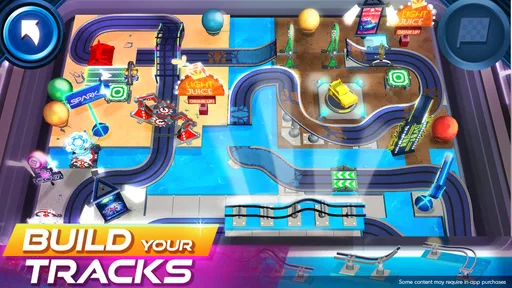
What keeps the loop interesting is the visible link between a design decision and a race. A child can make a car that looks unusual, then test it rather than leaving the idea as decoration. Track construction adds another layer: a course is not only a backdrop but something the player can shape. For a parent, that makes a short play session easier to frame as a creative task instead of simply more time spent driving around.
A practical tip is to encourage one change at a time. If a child alters the car and the track together, it can be hard to tell which choice made a run feel better or more difficult. Trying a familiar course with a newly designed car, or keeping the car and changing the route, gives the child a simple way to compare outcomes. That small habit turns experimentation into a satisfying little problem-solving exercise without making the game feel like homework.
Challenge works best when children set the pace
Track-building gives the game room to grow with a player’s confidence. A straightforward layout can keep a first attempt comfortable, while adding more turns or obstacles gives an experienced child a reason to concentrate. I like that the challenge can come from the player’s own construction rather than only from a fixed sequence of tougher races. That can make a replay feel fresh even when the basic activity remains familiar.
There is a trade-off here: a child who wants a clear campaign, frequent trophies, or a strong sequence of racing milestones may find a creation-led game less motivating. Race Craft is most appealing when the player enjoys making personal goals, such as testing a new car or seeing whether a track idea is playable. If a child mainly wants to beat opponents and unlock a steady stream of rewards, a more traditional arcade racer may be a better match.
Worth Reading Before You Choose

EA SPORTS FC Mobile 26 Is a Bigger Football Game, but It Takes Time

Flipboard Shows What News Apps Must Do Beyond the Feed

Switching to Android Auto Means Rethinking Your Driving Routine

Google Calendar Makes a Crowded Week Easier to Manage

Ludo King Makes the Most of the Minutes Between Plans

Baby Panda World Brings Quick Play to Modern Phones, but Its Game Library Feels Busy
What the numbers say about its audience
The game is free to download, and its average rating is 4.7 from around 32,000 ratings, with more than 10 million installs. Those figures suggest that many families have tried it, but they do not guarantee that every child will enjoy the same balance of building and racing. The current version is 2026.1.0, and it runs on Android 5.1 or later. I would treat compatibility as worth checking on an older device before handing it to a child.
There are in-app purchases, priced from $0.99 to $14.99 per item, so the earlier claim in the published review that there are none is not accurate. If you are setting it up for a child, check the device’s purchase controls first and agree on whether spending is allowed. The game is free to start, but that is different from promising that every option is available without a purchase. This is a small setup step that can prevent an otherwise pleasant play session from turning into a negotiation.
Unleash Your Inner Designer
One of the standout features of Race Craft - Kids Car Games is the ability to design your own cars. Kids can choose from a variety of parts to build their dream racing machine. The options feel endless, and it’s a joy to see how the little ones let their imaginations soar. Whether it’s a sleek speedster or a quirky creation with all sorts of bells and whistles, the design process is engaging and intuitive.
Even better, the app doesn’t require any reading skills, which is perfect for young children. Instead, it uses colorful icons and simple drag-and-drop mechanics. It's straightforward enough that kids can dive right into the action without needing much guidance. Trust me, the look on their faces when they see their custom car zoom down the track is priceless.
Racing Action Galore
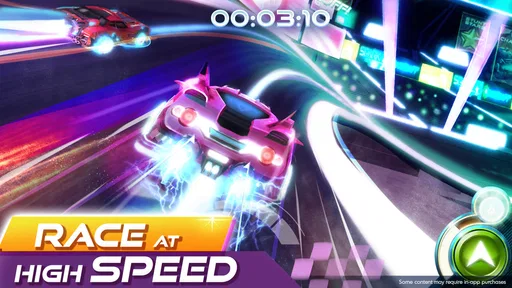
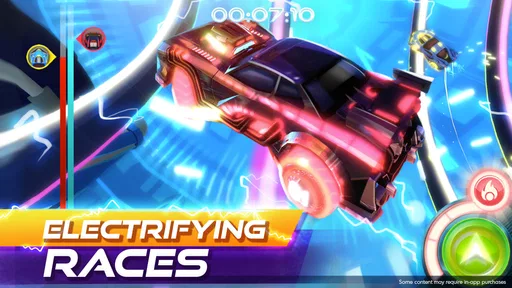
Once the cars are built, it’s time to hit the tracks! The racing mechanics in this app are simple, making it accessible for younger players, yet they provide enough challenge to keep things interesting. The controls are intuitive, using tap and swipe gestures to steer and accelerate. This makes the game not only fun but also a great way for kids to develop coordination and timing skills.
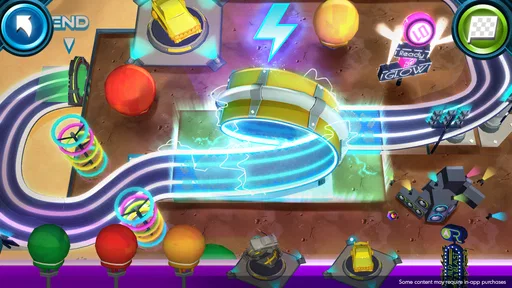
Each track is packed with vibrant colors and dynamic environments, from lush forests to icy landscapes. The developers really nailed it with the graphics, creating an engaging world that’s both visually appealing and fun to navigate. Plus, the sound effects and upbeat music add an extra layer of excitement, making the racing experience even more immersive.
Endless Customization
Customization doesn’t stop at car creation. Kids can also personalize their tracks, using a variety of blocks and obstacles. They can build ramps, loops, and even tricky turns to challenge their racing skills. This aspect of the game fosters creativity and problem-solving, as players must think about how to design tracks that are both fun and functional.
What’s really cool is that the app allows kids to save their creations. They can revisit favorite tracks and cars, tweaking them as their tastes and skills evolve. It’s a game that grows with them, providing new challenges and opportunities for creativity every time they play.
Child-Friendly Environment
One thing that stood out to me about Race Craft is its commitment to providing a safe and child-friendly gaming environment. There are no ads or in-app purchases, which means kids can play without interruptions or accidental buys. This is a huge relief for parents who want to ensure a safe digital playground for their children.
The app also promotes positive play, with no violence or negative themes. It’s all about fun, creativity, and friendly competition, which is exactly what I look for in a game for kids.
All in all, Race Craft - Kids Car Games is more than just a racing game. It’s an adventure in creativity, offering endless possibilities for fun and learning. Whether your child is a budding designer, a racing enthusiast, or just loves a good challenge, this app has something to offer. I’d say give it a spin and watch your little one’s face light up with joy!
A good fit for the in-between moments
I can see this working especially well during a short wait at a café or while a parent is preparing dinner: a child can spend a few minutes adjusting a car or trying a track, then pause when it is time to move on. The creative loop gives the session a natural stopping point. A useful family routine is to ask the child to show one change they made before putting the device away; it gives the play a sense of completion without turning it into a lesson.
Compared with conventional mobile racers, which often focus on quick laps, rival cars, or unlocking vehicles through repeated races, this one puts more emphasis on construction. That is its clearest distinction, and also its main trade-off. Children who like drawing, building toys, or inventing their own rules may find more to talk about here than in a racer built around lap times. A child who wants immediate competitive action with little time spent designing may prefer a straightforward arcade racer instead.
When the creative freedom needs a little guidance
Open-ended play can be a strength, but it can also leave some children unsure what to do next. If a child keeps changing pieces without enjoying the races, I would suggest choosing one simple goal together: make a car with a particular look, or build a course that is easy to finish. Then let the child take over. This gives the session a focus while preserving the freedom that makes the building side appealing.
Another helpful approach is to let the child revisit a favorite creation rather than always starting something new. Familiarity makes it easier to notice what a different track shape or car choice changes, and it avoids the feeling that progress means constantly replacing earlier work. The game’s appeal is not necessarily about reaching a final destination; the satisfaction can come from refining an idea and seeing it work in a race.
How long-term appeal may vary
The game’s progression is strongest for players who supply their own goals. Building, racing, and revising provide a repeatable cycle, but children who depend on explicit missions or a clear reward ladder may need an adult to help set a purpose for a session. I would not choose it as the only game for a child who loses interest unless every activity has a visible prize. For a child who enjoys experimenting, the same flexibility can keep the experience personal rather than repetitive.
Parents may also want to try the game alongside their child before deciding how independently it suits them. That gives you a chance to see whether the icons and controls make sense to your particular player, and to set expectations around optional purchases. The 906 written reviews reflect a substantial amount of feedback, but individual children differ: age, patience, and interest in creative play matter more than popularity when deciding whether it is the right choice at home.
My progression verdict
I recommend Race Craft most readily to children who like to make things and then test them, especially those who would rather invent a course than repeat the same kind of race. Its early goals are approachable, and the ability to shape both a vehicle and its route gives play a personal touch. The strongest reason to keep it installed is not a promise of endless new rewards, but the chance to revisit an idea and improve it in a way the child can see.
If your child prefers a tightly guided racing campaign, predictable unlocks, or head-to-head competition as the main attraction, I would look at a more traditional racer first. If they enjoy designing, trying, and making small adjustments, this is a more distinctive option in the children’s racing space. For me, that balance makes it a worthwhile free starting point, provided a parent keeps purchases in mind and matches the game to the child’s appetite for open-ended play.
Pros
- Engaging graphics keep kids entertained.
- Creative car building boosts imagination.
- Simple controls suitable for young kids.
- Frequent updates add new features.
- Educational content blended with fun.
Cons
- Limited tracks may feel repetitive.
- In-app purchases can add up quickly.
- Requires internet for some features.
- Ads may interrupt gameplay.
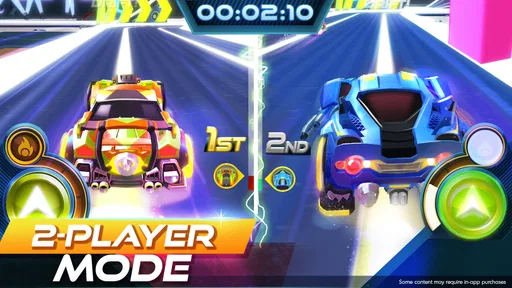
- No multiplayer mode available.
FAQs for Race Craft - Kids Car Games
What age group is Race Craft - Kids Car Games suitable for?
Race Craft - Kids Car Games is designed primarily for children aged 5 to 12. The game offers intuitive controls and engaging content that is tailored to keep younger players entertained while also providing educational value. Parents can be reassured that the game is both fun and age-appropriate.
Does Race Craft - Kids Car Games require an internet connection to play?
Race Craft - Kids Car Games can be played offline, making it convenient for use during travel or in areas with limited internet access. However, certain features, such as updates and additional content downloads, may require an internet connection.
Are there any in-app purchases in Race Craft - Kids Car Games?
Yes, Race Craft - Kids Car Games offers in-app purchases. These can include additional vehicles, tracks, or customization options. Parents can manage these purchases through parental controls to prevent unintentional spending by children.
What educational benefits does Race Craft - Kids Car Games offer?
Race Craft - Kids Car Games combines fun with learning by improving hand-eye coordination, strategic thinking, and problem-solving skills. Through building and racing custom tracks, children develop creativity and critical thinking, making the game both entertaining and educational.
Is Race Craft - Kids Car Games available on both Android and iOS platforms?
Yes, Race Craft - Kids Car Games is available for download on both Android and iOS devices. Users can find the app on the Google Play Store for Android devices and the Apple App Store for iOS devices, ensuring a wide range of accessibility.


